Taller sobre implicaciones de la legislación especial ante el Covid-19



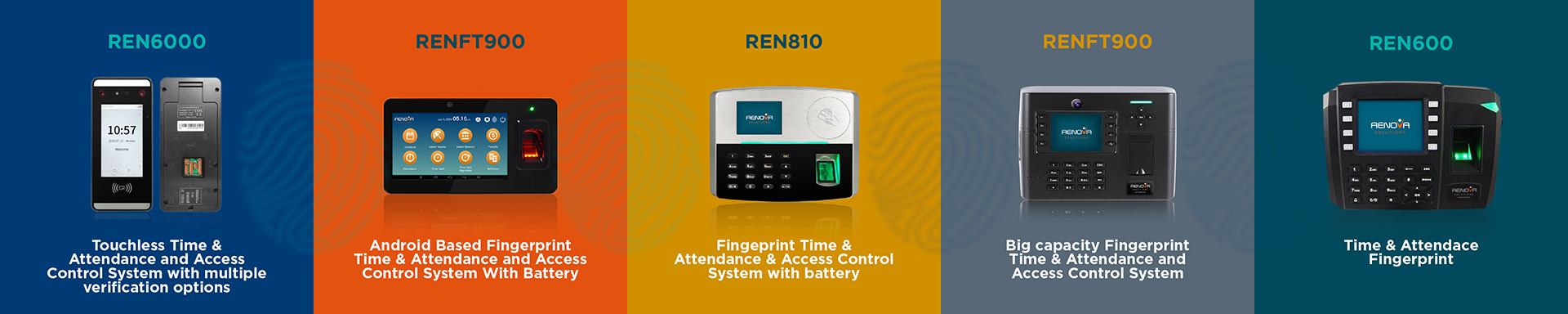
Biometric solutions for employee attendance management, like fingerprint watches, are booming for many reasons. These timekeeping devices help manage/control employee access, eliminate fraudulent attendance registration, improve security, and make check-in and check-out faster and more efficient than any other attendance control system.
Biometric clocks are helpful tools for accurately tracking and managing the clock-ins and clocks of hourly workers. They use fingerprint sensors or other bio-characteristic analytics to authenticate the data. Biometric clock systems work by measuring some unique aspect of an employee (such as their iris pattern or facial recognition) and using those measurements to confirm the employee's identity. Likewise, biometric fingerprint identification provides additional security to traditional verification methods, such as using a PIN or employee identification badge.
With the push of a finger, an employee can confirm their identity, check-in for work, and open the door. Your company can set up biometric clocks to allow only certain employees to enter certain areas. This solution is ideal for businesses that value efficiency and ensure their employees are in the right place at the right time.
It's easy for employees to abuse traditional watches, either intentionally or by mistake. Biometric clocks prevent "buddy punch" (when an employee uses another employee's PIN or ID card to check in when they're not working) by requiring any employee to be physically authenticated by the time clock system.
Biometric technology can keep customers out of designated spaces, track employee movement, and prevent break-ins and theft. While a lock key, passcode, or security card can be stolen or misused, biometric watches cannot. Using biometric devices records information so you'll always know who uses any device.
Biometric time and attendance systems significantly improve employee efficiency compared to traditional punch clocks. These systems are easy to set up and use for your employees and managers, saving your business time and money. Biometric clocks work best when integrated into a time and attendance solution to minimize employee errors and increase individual efficiency. Since biometric systems are reliable and easy to use, your employees will save time clocking in and out and will be able to focus more on their work.

Can you discuss the vision with a compelling narrative that inspires people? Can you find stories of employees living that mission? Can you share customer stories demonstrating how employees implement the vision?
Reinforce the importance of purpose by thanking employees who demonstrate mission and values. Post the thank you on your social networks, intranet, and emails. Call or visit the teams that have gone the extra mile. The possibilities of recognizing and thanking are endless; try to identify them.
Involve employees in defining and evolving your purpose so that they contribute to and understand it. The purpose is not isolated; it is not something that executives define on their own; everyone shares and lives it.
Ask, "How can we best work together to fulfill our purpose?" Asking "how" also creates a sense of purpose. In this way, purpose is not just something that happens to people; they are part of it. When purpose is present and palpable, amazing things happen.

Employee experience begins from the moment someone sees a job offer, to everything they learn, do, see, and feel until they leave the company. For an organization to master the management of the Employee Experience, it must listen to its people at each stage of the life cycle, identify what matters most to them, and create personalized experiences.
Employee experience is critical to business performance. Maintaining a great customer experience, improving products, and building a strong, reputable brand requires the help of your employees. Ultimately, their experiences (positive and negative) will impact how hard they work, how much they collaborate, and whether they invest in improving operational performance.
The shift to a more holistic approach to employee experience has been driven by several factors, including social media, changing demographics, and more volatile economic conditions. They want more opportunities to express their opinions, and companies need to deeply understand a group that feels, thinks, and behaves differently than previous generations.
There are now fewer candidates for more jobs, and employee experiences and referrals are ways for employers to differentiate themselves.
Digitalization, disruption, and other economic forces are causing businesses to shrink and expand faster. It forces them to understand the impact these changes have on employees. As changes are more frequent, more than an annual survey is required.
Employees now expect to be treated as unique, just as they are when interacting with major consumer brands.
The possibility of negative reviews going viral has led to an expectation of greater transparency with consumers and employees. Companies that do this have found it to be a tool to protect their reputations and brands and make their employees their best promoters.
By focusing on employee behaviors and improving employee experiences, the world's leading brands have discovered that these actions have knock-on effects, not only on traditional HR metrics such as turnover and absenteeism rates but also on customer experience and overall profitability.
By: Wilfredo Cosme-Ortiz, President of RENOVA Solutions, Corp.
If you want to activate Microsoft Office 2016 without any hassle, downloading the KMS activator office 2016 is a simple and effective solution. This tool helps users unlock all the features of Office 2016 quickly and safely. By using the KMS activator office 2016, you can avoid the limitations of trial versions and enjoy full access to Word, Excel, PowerPoint, and other Office apps.
The KMS activator office 2016 works by connecting your software to a local server that validates the license, making the activation process smooth and reliable. It is designed to be user-friendly, so even those who are not tech-savvy can activate their Office suite without difficulty. This method is popular because it does not require purchasing a product key, which can sometimes be expensive or hard to find.
Using the KMS activator office 2016 ensures that your Microsoft Office 2016 remains genuine and fully functional. It also helps prevent annoying reminders to activate the software, allowing you to focus on your work or studies without interruptions. Overall, this activator is a trusted choice for many people who want to make the most out of their Office 2016 experience.
Using the kms activator office 2016 is one of the easiest Office 2016 activation methods available. This Office 2016 activation software helps you complete the Office 2016 activation steps quickly and without confusion. Whether you are new to activating software or need a clear Office 2016 activation guide, this method simplifies the process.
The kms activator office 2016 works by simulating a local server that validates your Office 2016 license. This means you don’t need to enter a product key manually. Instead, the activator handles everything behind the scenes, making the activation smooth and fast.
Here is a simple table showing the benefits of using kms activator office 2016:
| Feature | Benefit |
|---|---|
| No product key required | Easy and quick activation |
| Works offline and online | Flexible activation options |
| User-friendly interface | Suitable for beginners |
| Supports all Office 2016 apps | Full access to all features |
The kms activator office 2016 is a special Office 2016 activation software that uses a Key Management Service (KMS) to activate Microsoft Office. Instead of using a traditional product key, it connects your Office 2016 to a virtual server that confirms your license is valid.
This Office 2016 activation method is popular because it automates the activation process. It runs quietly in the background and completes the Office 2016 activation steps without needing much input from you. The activator ensures that your Office 2016 remains genuine and fully functional.
Follow these simple Office 2016 activation steps to use the kms activator office 2016:
Tip: Always follow the Office 2016 activation guide carefully to avoid errors during the process.
The kms activator office 2016 supports both online and offline activation methods. Here’s a quick comparison:
| Activation Method | Description | Pros | Cons |
|---|---|---|---|
| Online Activation | Connects to a virtual server via internet | Fast and automatic | Requires internet connection |
| Offline Activation | Uses local server simulation without internet | Works without internet access | Slightly longer process |
Choosing the right Office 2016 activation method depends on your internet availability and preferences. Both methods use the same Office 2016 activation software but differ in how they connect to the license server.
After completing the Office 2016 activation steps with the kms activator office 2016, it is important to verify the activation status. You can do this by:
If the status shows “Product Activated,” your Office 2016 is ready to use with all features unlocked. If not, you may need to repeat the Office 2016 activation method or consult the Office 2016 activation guide for troubleshooting tips.
When you face Office 2016 activation issues, it can stop you from using important features in your software. These problems might happen because of incorrect product keys, internet connection troubles, or software glitches. Office 2016 activation troubleshooting helps find the cause and fix these problems so you can use your Office apps without interruptions.
If you run into Office 2016 activation problems, getting proper Office 2016 activation support is important. Support can guide you through steps to solve the issue or explain what might be wrong. Sometimes, simple fixes like checking your license or running the activation wizard again can solve the problem quickly.
Here is a list of common steps to try when dealing with activation issues:
Many users experience similar Office 2016 activation problems. Here are some common errors and how to fix them:
| Error Message | Cause | Solution |
|---|---|---|
| “Activation Failed” | Wrong product key or no internet | Re-enter key, check connection |
| “Product Key Blocked” | Key used too many times | Use a new valid key |
| “Activation Limit Reached” | Key limit exceeded | Contact support for help |
| “Unable to Connect to Server” | Network or server issues | Check internet, try later |
Note: Always keep your Office 2016 updated to avoid many activation problems.
The KMS server method is a popular way to activate Office 2016, especially in organizations. If you have Office 2016 activation problems using KMS, try these steps:
If the KMS server is unreachable, you might see errors. In that case, contact your IT department or use Office 2016 activation support for help.
Sometimes, users switch from MAK (Multiple Activation Key) to KMS (Key Management Service) activation. MAK activates Office on each device individually, while KMS uses a server to activate many devices.
Here is a simple comparison:
| Activation Type | How It Works | Best For |
|---|---|---|
| MAK | One key per device activation | Small number of devices |
| KMS | Server activates many devices | Large organizations |
Switching from MAK to KMS can solve some Office 2016 activation issues by centralizing activation. This method requires proper setup of the KMS server and client configuration.
The Office 2016 activation wizard helps guide users through the activation process. If you face Office 2016 activation issues, try these tips:
Tip: If activation fails, restart your computer and try the wizard again. Sometimes, repeated attempts fix temporary glitches.
Using these troubleshooting and support tips can help you solve Office 2016 activation problems quickly and get back to work without delays.
Before using the Office 2016 activation software, it is important to know the system requirements and how to install the Office 2016 activation tool properly. This ensures the Office 2016 activation process goes smoothly and without errors. The KMS activator is designed to work on Windows systems and helps users activate Office 2016 using a simple Office 2016 activation method.
The installation involves downloading the correct version of the Office 2016 activation software and following clear steps to set it up. Once installed, the Office 2016 activation tool can be used to complete the Office 2016 activation process quickly and safely.
To run the KMS activator for Office 2016, your computer should meet these minimum system requirements:
| Component | Requirement |
|---|---|
| Operating System | Windows 7, 8, 8.1, 10, or 11 |
| Processor | 1 GHz or faster |
| RAM | At least 1 GB |
| Disk Space | Minimum 500 MB free |
| Administrator Rights | Required for installation |
Meeting these requirements helps the Office 2016 activation software run without issues. The Office 2016 activation method depends on having a compatible system to simulate the local server needed for activation.
Downloading and installing the Office 2016 activation tool is easy if you follow these steps:
This Office 2016 activation method does not require complicated settings. The Office 2016 activation tool guides you through the process, making it simple even for beginners.
One of the benefits of using this Office 2016 activation software is that it can work without an internet connection. This makes the Office 2016 activation process safer and more private.
Important Tips for Offline Activation:
- Disconnect from the internet before starting the activation.
- Run the Office 2016 activation tool as administrator.
- Follow the instructions carefully to avoid errors.
- Reconnect to the internet only after the activation is complete.
Using the Office 2016 activation method offline reduces the risk of interference from online servers or network issues. It also helps protect your computer from unwanted connections during activation. This Office 2016 activation tool is designed to simulate a local server, so it does not need to connect to the internet to verify your license.
Many users have Office 2016 activation questions when using the KMS activator. This section answers common queries to help you understand the Office 2016 activation method better and solve issues quickly.
The KMS activator uses a special Office 2016 activation method that connects your software to a virtual server. This server confirms your license without needing a product key. It makes activation fast and easy by simulating a local server on your computer.
If you face problems during activation, Office 2016 activation support is available to guide you. Support can help with troubleshooting steps, explain error messages, and provide advice on how to complete the activation process successfully.
Office 2016 activation troubleshooting involves checking your internet connection, verifying your license, and running the activation tool again. Sometimes, restarting your computer or disabling antivirus temporarily can fix the issue.
Quick Troubleshooting Checklist:
- Check internet connection
- Verify license key or activation status
- Run activation software as administrator
- Restart your PC and try again
- Contact support if problems persist
Yes, the KMS activator supports offline activation. This Office 2016 activation method simulates a local server, so you don’t need an internet connection. Just disconnect before starting and reconnect after activation is complete.
| Activation Type | Description | Internet Needed? |
|---|---|---|
| Online | Connects to virtual server | Yes |
| Offline | Simulates local server | No |
The KMS activator is designed to activate Office 2016 quickly, but users should be aware of legal considerations. Always ensure you have a valid license and understand the terms of use for your software.
Note: For official support and legal activation, consider contacting Microsoft or authorized dealers.
Many activation errors happen due to incorrect keys or network issues. To avoid these: